Worthing High School
 South Downs Education Trust
Lock Down News from the LRC!
Year 7 and 8 Reading Targets have been set for this half term, please can you encourage your child to achieve these. They are set on them reading for 20 minutes each day.
Congratulations to Samuel Hicks for getting his Gold Award on Accelerated Reader, a Kindle Fire is making its way to you. Fantastic achievement.
Congratulations also to Tyler Urbacz who has achieved 7,500,000 million words on Accelerated Reader, your voucher is on the way.
Congratulations to Ivan Kinshot-Acklan for 5 million words read, a Kindle Fire is making its way to you.
I would like to say well done to the following students for quizzing during the Easter Break. Some of you achieved amazing results!
Year 7
|
Sudhish Amarasinghe |
Samuel Ludlow |
|
Courtney Blackwood |
George Solomon |
|
Ellie Caisley |
Archie Stepney |
|
Daniel Cox |
Samuel Suss |
|
Catitlin Farron |
Toby Taylor |
|
Rory Fallon |
Tyler Urbacz |
|
George Ferris |
Thomas Valantin |
|
Jay Gutierrez |
Jianwei Wu |
|
Alexander Kingshott |
|
Year 8
|
Rueben Cross |
Darcie Lacey |
|
Morgan Dickie |
Evie Mason |
|
Sam Elphick |
Danielle Pike |
|
Casper Finch |
Poppie Reece |
|
Louise Griffiths |
Iggy Scott |
|
Samuel Hicks |
|
Problems Quizzing??
Many students are emailing saying they can’t get on to Accelerated Reader and it is not recognising their password. This is usually because they are going to the wrong website. DON’T search for Accelerated Reader, most of the time it takes them to the wrong school account. This is the link they should use: https://ukhosted5.renlearn.co.uk/2249035/default.aspx
User names and passwords are in their planners. If not email aphelan@worthinghigh.net
Free online Reading Resources
https://readon.myon.co.uk/ here there are lots of free resources you can read online with a mixture of fiction and non fiction.
To search for books in your reading range, follow the instructions below:
Select Start Reading then Search
Click on this icon 
(NOT reading level)
This lets you select books in the reading level you require. Just pick the number below and then click on the search key.

It then brings up all the books in that level. Not all have quizzes, to check just hover over the book and select info and then details at the top. You will see something like this
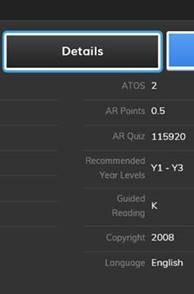
If it has a quiz number you can quiz on it.